Decoration and Console Colors
For color console support use decorate style where style is a color name or a semantic meaning, each of which
behave similarly:
Examples:
decorate green < "$file"
decorate info Starting to deploy ...
Zesk Build allows for customizations of all decoration colors to custom values allowing themes to be created.
decorate
decorate text using colors and styles
Usage
decorate style [ text ... ]
Singular decoration function which allows access to console colors, links, and custom formatting for any type in the system. If no text is supplied the default is to read input from stdin.
Special argument --
Passing the special argument -- for text will skip reading input from stdin and instead continue decorating any
additional arguments, if any. This allows blank arguments to be processed correctly by the internal implementation of
decorate as well as the extensions. To output the text -- you MUST pipe it to stdin or pass the argument twice:
> decorate info -- I like two dashes on my lines
I like two dashes on my lines
> decorate info -- -- I like two dashes on my lines
-- I like two dashes on my lines
Ideally we would be able to check if any input is available on stdin without having to wait, but some versions of
Bash read does not support a timeout of zero (which is effectively a select to see if stdin
has data) this allows us to disambiguate when stdin is expected and should be read and cases where arguments may be
blank unintentionally but intended to be decorated. Sadly, if executeInputSupport worked with a timeout of zero then
this would not be needed.
The use case where this happens is:
decorate info "${NOT-items[@]}"
Where items may be empty. Without the -- this takes a second on some platforms for read to timeout. Generally
speaking, this is acceptable for the behavior but should be avoided at all costs.
😎 dude@mai ~/Developer/build > timing decorate info
decorate info 1 second, 55ms [1055]
😎 dude@mai ~/Developer/build > timing decorate info --
decorate info -- 35ms [35]
Extending Decorations
You can extend this function by writing a your own extension prefixed with __decorationExtension.
For example, the function __decorationExtensionCustom is called for decorate custom. The style name is converted as follows prior to determining the function to call:
- All
-characters are converted to_characters - The first letter of the style is capitalized. (Remaining characters are unchanged.)
If the function exists, it is used for the decoration. Additionally, if the function plus the suffix .Pure exists, it is called without executeInputSupport which means your decoration function must handle stdin and arguments correctly.
This is useful when you handle stdin differently than executeInputSupport or need to handle -- parameters differently.
Built-in extensions:
- decorate diff - Decoration for `diff -U0` (source)
- decorate each - Runs the following command on each subsequent argument for formatting (source)
- __decorateExtensionFile - decorate file links (source)
- decorate pair - Output a name value pair (decorate extension) (source)
- decorate quote - Double-quote all arguments (source)
- decorate size - Size converted to kilo, mega, giga bytes. (source)
- decorate wrap - Prefix output lines with a string (source)
Location:
bin/build/tools/decorate/core.sh
Arguments
style- String. Required. One of: reset underline no-underline bold no-bold black black-contrast blue cyan green magenta orange red white yellow code info notice success warning error subtle label value decorationtext ...- String. Optional. Text to output. If not supplied, outputs a code to change the style to the new style. May contain arguments forstyle.
Reads standard input
String. Optional. Text to decorate.
Writes to standard output
Decorated text
Return codes
0- Success1- Environment error2- Argument error
Environment
- __BUILD_DECORATE - String. Cached color lookup.
BUILD_COLORSBuild Colors Flag – Boolean. If true then colors are shown, blank means guess the - Boolean. Colors enabled (trueorfalse).
Requires
- isFunction - Is argument a bash function? (source)
- catchArgument - Run `command`, upon failure run `handler` with an argument error (source)
- catchReturn - Run binary and catch errors with handler (source)
awk- bashDocumentation - Universal function documentation (source)
- helpArgument - Simple help argument handler. (source)
- executeInputSupport - Support arguments and stdin as arguments to an executor (source)
decorateInitialized
Is the decorate color system initialized yet?
Usage
decorateInitialized [ --help ]
Is the decorate color system initialized yet? Useful to set our global color environment at the top level of a script if it hasn't been initialized already.
Location:
bin/build/tools/decorate/core.sh
Arguments
--help- Flag. Optional. Display this help.
Return codes
0- Success1- Environment error2- Argument error
Requires
- helpArgument - Simple help argument handler. (source)
decorations
Output a list of build-in decoration styles, one per line
Usage
decorations [ --help ]
Output a list of build-in decoration styles, one per line
Location:
bin/build/tools/decorate/core.sh
Arguments
--help- Flag. Optional. Display this help.
Return codes
0- Success1- Environment error2- Argument error
Requires
- helpArgument - Simple help argument handler. (source)
- convertValue - map a value from one value to another given from-to (source)
decorateStyle
Get or modify a decoration style
Usage
decorateStyle style [ newFormat ]
When newFormat is blank, retrieves the format style.
Otherwise sets the new style.
Location:
bin/build/tools/decorate/style.sh
Arguments
style- String. Required. The style to fetch or replace.newFormat- String. Optional. The new style formatting options as a string in the formescapeCodes label
Return codes
0- Success1- Environment error2- Argument error
colorScheme
Set the terminal color scheme to the specification
Usage
colorScheme [ --help ] [ --handler handler ] [ --debug ]
Set the terminal color scheme to the specification
Location:
bin/build/tools/colors.sh
Arguments
--help- Flag. Optional. Display this help.--handler handler- Function. Optional. Use this error handler instead of the default error handler.--debug- Flag. Optional. Show additional debugging information.
Reads standard input
Scheme definition with colorName=colorValue on each line
Return codes
0- Success1- Environment error2- Argument error
Semantic color commands
Color commands intended to convey status of messages. Try colorSampleSemanticStyles to see all colors.
decorate info- Informational messagesdecorate notice- Notice messagesdecorate warning- Warning messagesdecorate success- Success messagesdecorate decoration- Lines or decoration textdecorate error- Error messagesdecorate label- Used for label/value pairsdecorate value- Used for label/value pairsdecorate code- Code output
Color commands
Colors vary depending on the console and the terminal. Try colorSampleStyles to see all colors.
Standard ANSI Colors
decorate reddecorate greendecorate cyandecorate bluedecorate orangedecorate magentadecorate blackdecorate white
Text decoration
decorate underlinedecorate bold
Decorate extensions
Examples:
decorate BOLDstyletext...decoratepair[width]namevalue...decorateeach[ ``--count][--index]styleitem1item2...decoratesizevaluedecorate big "Welcome to Zesk" | decorate box | decorate at 1 1decoratepairnamevalue ...decoratewrapprefixsuffix ...decoratequoteword...decoratefilepathdecoratelinkurl[text]decorateboxHello
decorate BOLD
Add bold style to another style
Usage
decorate BOLD style [ text ... ]
Add bold style to another style
Location:
bin/build/tools/decorate/core.sh
Arguments
style- CommaDelimitedList. Required. Style arguments passed directly to decorate for each item.text ...- EmptyString. Optional. Text to format. Use--to output begin codes only.
Examples
decorate BOLD info Info is more importantInfo is more important
Return codes
0- Success1- Environment error2- Argument error
decorate each
Runs the following command on each subsequent argument for formatting
Usage
decorate each style [ -- ] [ --index ] [ --count ]
Runs the following command on each subsequent argument for formatting Also supports formatting input lines instead (on the same line)
Location:
bin/build/tools/decorate/core.sh
Arguments
style- CommaDelimitedList. Required. Style arguments passed directly to decorate for each item.--- Flag. Optional. Pass as the first argument after the style to avoid reading arguments from stdin.--index- Flag. Optional. Show the index of each item before with a colon.0:first 1:secondetc.--count- Flag. Optional. Show the count of items in the list after the list is generated.
Examples
decorate each code -- "$@"
Return codes
0- Success1- Environment error2- Argument error
Requires
decorate pair
Output a name value pair (decorate extension)
Usage
decorate pair [ characterWidth ] name [ value ... ]
The name is output left-aligned to the characterWidth given and colored using decorate label; the value colored using decorate value.
Location:
bin/build/tools/decorate/pair.sh
Arguments
characterWidth- UnsignedInteger. Optional. Number of characters to format the value for spacing. Uses environment variable BUILD_PAIR_WIDTH if not set.name- String. Required. Name to outputvalue ...- String. Optional. One or more Values to output as values forname(single line)
Return codes
0- Success1- Environment error2- Argument error
Environment
BUILD_PAIR_WIDTHPair Width – PositiveInteger. Width for pairs. Defaults to40.
decorate wrap
Prefix output lines with a string
Usage
decorate wrap [ --help ] [ --fill fillCharacter ] [ --width fillWidth ] prefix [ suffix ... ]
Wrap lines with a string, useful to format output or add color codes to consoles which do not honor colors line-by-line. Intended to be used as a pipe.
Location:
bin/build/tools/decorate/wrap.sh
Arguments
--help- Flag. Optional. Display this help.--fill fillCharacter- Character. Optional. Fill entire line with this character.--width fillWidth- UnsignedInteger. Optional. Line width to fill withfillCharacter.prefix- EmptyString. Required. Prefix each line with this textsuffix ...- String. Optional. Prefix each line with this text
Examples
cat "$file" | decorate wrap "CODE> " " <EOL>"
cat "$errors" | decorate wrap "    ERROR: [" "]"
Return codes
0- stdout contains input wrapped with text1- Environment error2- Argument error
decorate quote
Double-quote all arguments
Usage
__decorateExtensionQuote
Double-quote all arguments as properly quoted bash string. Mostly $ and " are problematic within a string.
Location:
bin/build/tools/decorate/core.sh
Arguments
- none
Examples
> decorate quote "$title"
"Can't believe it was only \$0.99?"
Return codes
0- Success1- Environment error2- Argument error
Requires
__decorateExtensionFile
decorate file links
Usage
__decorateExtensionFile [ --no-app ] fileName [ text ]
decorate extension for file
Location:
bin/build/tools/console.sh
Arguments
--no-app- Flag. Optional. Do not map the application path indecoratePathfileName- Required. File path to output.text- String. Optional. Text to output linked to file.
Return codes
0- Success1- Environment error2- Argument error
Environment
BUILD_HOMEBuild Home Directory – Directory.BUILD_HOMEis.when this code is installed - at TMPDIR HOME
See Also
- decoratePath - Display file paths and replace prefixes with icons (source)
decorate link
decorate web links
Usage
decorate link url [ text ]
decorate extension for link
Location:
bin/build/tools/console.sh
Arguments
url- Required. Link to output to the console.text- String. Optional. Text to output linked tourl.
Return codes
0- Success1- Environment error2- Argument error
decorate size
Size converted to kilo, mega, giga bytes.
Usage
decorate size [ size ]
Size converted to kilo, mega, giga bytes.
Location:
bin/build/tools/decorate/size.sh
Arguments
size- UnsignedInteger. Optional. Size to display.
Examples
> decorate size 169204
165k (169204)
> decorate size 16920400232
15G (16920400232)
Return codes
0- Success1- Environment error2- Argument error
Requires
printf- decorate - decorate text using colors and styles (source)
- isUnsignedInteger - Is value an unsigned integer? (source)
decorate box
Box around content
Usage
decorate box [ --type (ascii|line|double-line) ] [ --outside outsideStyle ] [ --inside insideStyle ] [ --width characterCount ] [ --size lineCount ] [ --fill fileCharacter ] [ text ... ] [ --help ]
Box around content
Location:
bin/build/tools/decorate/box.sh
Arguments
--type (ascii|line|double-line)- ` - String. Optional. Line style. Defaultline---outside outsideStyle- String. Optional. Style to apply to the outside border. (Defaultdecoration)
---inside insideStyle- String. Optional. Style to apply to the inside content. (Defaultdecoration)
---width characterCount- UnsignedInteger|String. Optional. Box width. Specify "auto" to make size of content, or "console" forconsoleWidth. Defaults toconsole.
---size lineCount- UnsignedInteger. Optional. Print this many blank lines between the header and title. (Default none)
---fill fileCharacter- String. Optional. Use this character to fill empty space in the box.
-text ...- String. Optional. Text to put in the box, one per line.
---help` - Flag. Optional. Display this help.
Examples
__decorateExtensionBox --style ascii "Moving ..."
__decorateExtensionBox --style line Hello
__decorateExtensionBox --style double-line "I'm sorry, Hal, I'm afraid I can't do that.
Sample Output
+==========================================================================+
| Moving ...                                                               |
+==========================================================================+
┌──────────────────────────────────────────────────────────────────────────┐
│ Hello                                                                    │
└──────────────────────────────────────────────────────────────────────────┘
╔══════════════════════════════════════════════════════════════════════════╗
║ I'm sorry, Hal, I'm afraid I can't do that.                              ║
╚══════════════════════════════════════════════════════════════════════════╝
Return codes
0- Success1- Environment error2- Argument error
decorate big
Display large text in the console for banners and important
Usage
decorate big text [ --bigger ]
Display large text in the console for banners and important messages
BUILD_TEXT_BINARY can be figlet or toilet
standard (figlet)
 _     _      _____         _
| |__ (_) __ |_   _|____  _| |_
| '_ \| |/ _` || |/ _ \ \/ / __|
| |_) | | (_| || |  __/>  <| |_
|_.__/|_|\__, ||_|\___/_/\_\\__|
         |___/
--bigger (figlet)
 _     _    _______        _
| |   (_)  |__   __|      | |
| |__  _  __ _| | _____  _| |_
| '_ \| |/ _` | |/ _ \ \/ / __|
| |_) | | (_| | |  __/>  <| |_
|_.__/|_|\__, |_|\___/_/\_\\__|
          __/ |
         |___/
smblock (regular) toilet
▌  ▗   ▀▛▘     ▐
▛▀▖▄ ▞▀▌▌▞▀▖▚▗▘▜▀
▌ ▌▐ ▚▄▌▌▛▀ ▗▚ ▐ ▖
▀▀ ▀▘▗▄▘▘▝▀▘▘ ▘ ▀
smmono12 (--bigger) toilet
▗▖     █       ▗▄▄▄▖
▐▌     ▀       ▝▀█▀▘           ▐▌
▐▙█▙  ██   ▟█▟▌  █   ▟█▙ ▝█ █▘▐███
▐▛ ▜▌  █  ▐▛ ▜▌  █  ▐▙▄▟▌ ▐█▌  ▐▌
▐▌ ▐▌  █  ▐▌ ▐▌  █  ▐▛▀▀▘ ▗█▖  ▐▌
▐█▄█▘▗▄█▄▖▝█▄█▌  █  ▝█▄▄▌ ▟▀▙  ▐▙▄
▝▘▀▘ ▝▀▀▀▘ ▞▀▐▌  ▀   ▝▀▀ ▝▀ ▀▘  ▀▀
           ▜█▛▘
Location:
bin/build/tools/decorate/big.sh
Arguments
text- String. Required. Text to output--bigger- Flag. Optional. Text font size is bigger.
Return codes
0- Success1- Environment error2- Argument error
Environment
BUILD_TEXT_BINARYText Executable – Callable. Binary used to generatedecorate big
decorate at
Experimental
Usage
decorate at [ x ] [ y ] [ text ... ]
Experimental Place text at a position on the console.
Location:
bin/build/tools/decorate/big.sh
Arguments
x- Integer. Console X offsety- Integer. Console Y offsettext ...- EmptyString. Text line to output at the x,y console location. Additional lines are placed below the previous line.
Return codes
0- Success1- Environment error2- Argument error
decorate diff
Decoration for
diff -U0
Usage
decorate diff leftStyle rightStyle
Removes most diff character decoration and replaces with colors
Location:
bin/build/tools/diff.sh
Arguments
leftStyle- String. Required. Style for left file linesrightStyle- String. Required. Style for right file lines
Return codes
0- Success1- Environment error2- Argument error
decorate expired
Utility to display key expiration
Usage
decorate expired keyDate upToDateDays [ --name name ] [ --help ]
For security one should update keys every ... number of days.
f.k.a. is``UpToDate
This value would be better encrypted and tied to the key itself so developers
can not just update the value to avoid the security issue.
This tool checks the value and checks if it is upToDateDays of today; if not this fails.
It will also fail if:
upToDateDaysis less than zero or greater than 366keyDateis empty or has an invalid value
Otherwise, the tool may output a message to the console warning of pending days, and returns exit code 0 if the keyDate has not exceeded the number of days.
Outputs a big text message as it gets closer.
Location:
bin/build/tools/decorate/expired.sh
Arguments
keyDate- Date. Required. Formatted likeYYYY-MM-DD. Truncated at 10 characters as well.upToDateDays- Integer. Required. Days that key expires afterkeyDate.--name name- String. Optional. Name of the expiring item for error messages.--help- Flag. Optional. Display this help.
Examples
if !decorate expired "$AWS_ACCESS_KEY_DATE" 90; then
  decorate big Failed, update key and reset date
  exit 99
fi
Return codes
0- Success1- Environment error2- Argument error
See Also
- dateWithinDays - Is a date in the past beyond its expiration date? (source)
Creating extensions
You can add your own decoration extension to your code by creating a function named:
__decorateExtensionFoo- wherefoo(lower case first letter) is the decoration name
Your function will be called by executeInputSupport which handles converting
arguments from stdin into multiple calls to your function.
If you want to handle input from stdin on your own, create a function instead named:
__decorateExtensionFoo.Pure- wherefoo(lower case first letter) is the decoration name
This should handle reading from stdin or arguments and handle either appropriately.
Additional commands
consoleLineFill
Clear a line in the console
Usage
consoleLineFill [ textToOutput ]
Clears current line of text in the console
Intended to be run on an interactive console, this clears the current line of any text and replaces the line with spaces.
Intended to be run on an interactive console. Should support $(tput cols).
Location:
bin/build/tools/colors.sh
Arguments
textToOutput- String. Optional. Text to display on the new cleared line.
Return codes
0- Success1- Environment error2- Argument error
statusMessage
Output a status message and display correctly on consoles with animation and in log files
Usage
statusMessage [ --last ] [ --first ] [ --inline ] command
Output a status message
This is intended for messages on a line which are then overwritten using consoleLineFill
Clears the line and outputs a message using a command. Meant to show status but not use up an output line for it.
When $(consoleHasAnimation) is true:
$(--first) - clears the line and outputs the message starting at the left column, no newline $(--last) - clears the line and outputs the message starting at the left column, with a newline $(--inline) - Outputs the message at the cursor without a newline
When $(consoleHasAnimation) is false:
$(--first) - outputs the message starting at the cursor, no newline $(--last) - outputs the message starting at the cursor, with a newline $(--inline) - Outputs the message at the cursor with a newline
Location:
bin/build/tools/colors.sh
Arguments
--last- Flag. Optional. Last message to be output, so output a newline as well at the end.--first- Flag. Optional. First message to be output, only clears line if available.--inline- Flag. Optional. Inline message displays with newline when animation is NOT available.command- Required. Commands which output a message.
Examples
statusMessage decorate info "Loading ..."
bin/load.sh >>"$loadLogFile"
consoleLineFill
Return codes
0- Success1- Environment error2- Argument error
Environment
- Intended to be run on an interactive console. Should support $(tput cols).
Requires
- throwArgument - Run `handler` with an argument error (source)
- consoleHasAnimation - Does the console support animation? (source)
- catchEnvironment - Run `command`, upon failure run `handler` with an environment error (source)
- decorate - decorate text using colors and styles (source)
- validate - Validate a value by type (source)
- consoleLineFill - Clear a line in the console (source)
consoleHasColors
Sets the environment variable
BUILD_COLORSif not set, usesTERM
Usage
consoleHasColors [ --help ]
Sets the environment variable BUILD_COLORS if not set, uses TERM to calculate
Location:
bin/build/tools/decorate/core.sh
Arguments
--help- Flag. Optional. Display this help.
Return codes
0- Console or output supports colors1- Colors are likely not supported by console
Environment
BUILD_COLORSBuild Colors Flag – Boolean. If true then colors are shown, blank means guess the - Boolean. Optional. Whether the build system will output ANSI colors.
Requires
- isPositiveInteger - Test if an argument is a positive integer (non-zero) (source)
tput- helpArgument - Simple help argument handler. (source)
- convertValue - map a value from one value to another given from-to (source)
consoleHasAnimation
Does the console support animation?
Usage
consoleHasAnimation
Does the console support animation?
Location:
bin/build/tools/colors.sh
Arguments
- none
Return codes
0- Supports console animation1- Does not support console animation
Color tests
colorSampleCombinations
Show combinations of foreground and background colors in the console.
Usage
colorSampleCombinations [ --help ]
Show combinations of foreground and background colors in the console.
Location:
bin/build/tools/colors.sh
Arguments
--help- Flag. Optional. Display this help.
Return codes
0- Success1- Environment error2- Argument error
Sample output
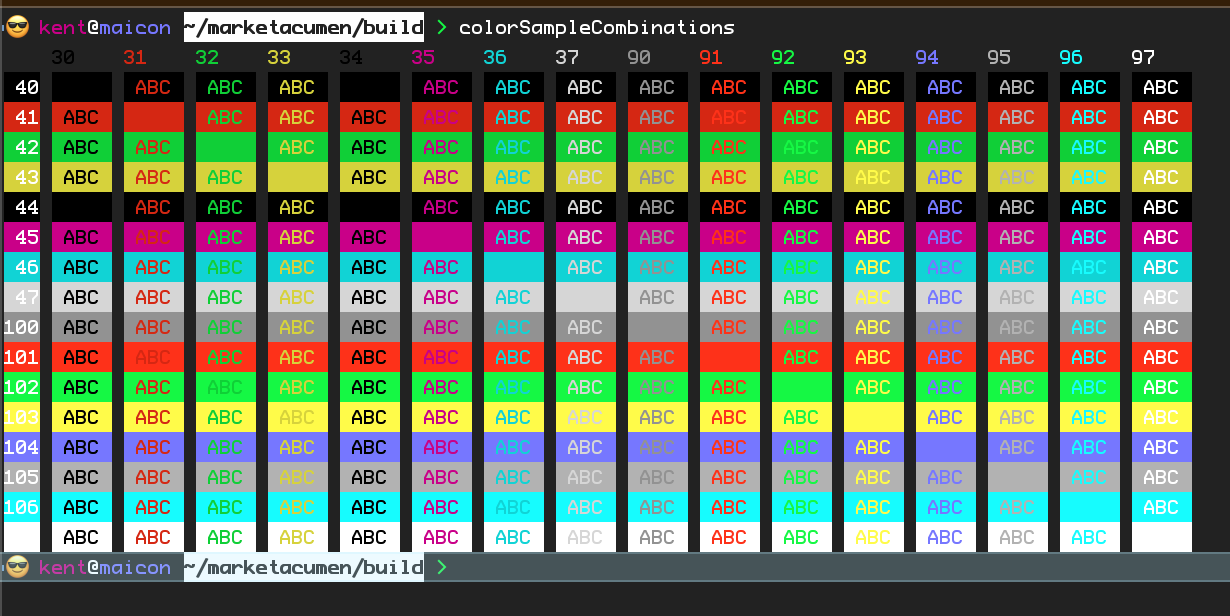
colorSampleCodes
Alternate color output
Usage
colorSampleCodes [ --help ]
If you want to explore what colors are available in your terminal, try this.
Location:
bin/build/tools/colors.sh
Arguments
--help- Flag. Optional. Display this help.
Return codes
0- Success1- Environment error2- Argument error
Sample output
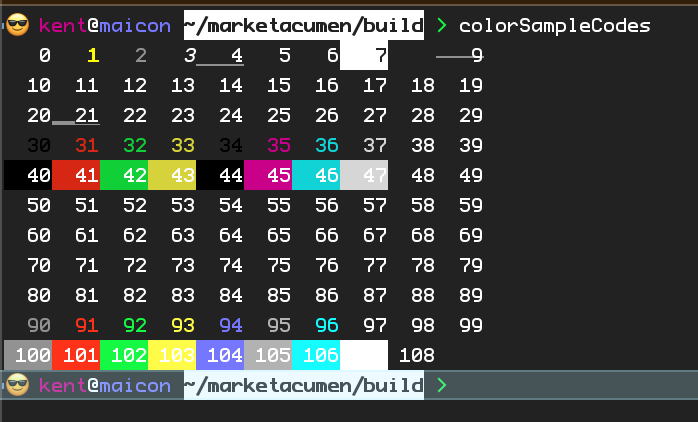
colorSampleStyles
Output colors
Usage
colorSampleStyles
Outputs sample sentences for the consoleAction commands to see what they look like.
Location:
bin/build/tools/colors.sh
Arguments
- none
Writes to standard output
ConsoleText
Return codes
0- Success1- Environment error2- Argument error
Sample output
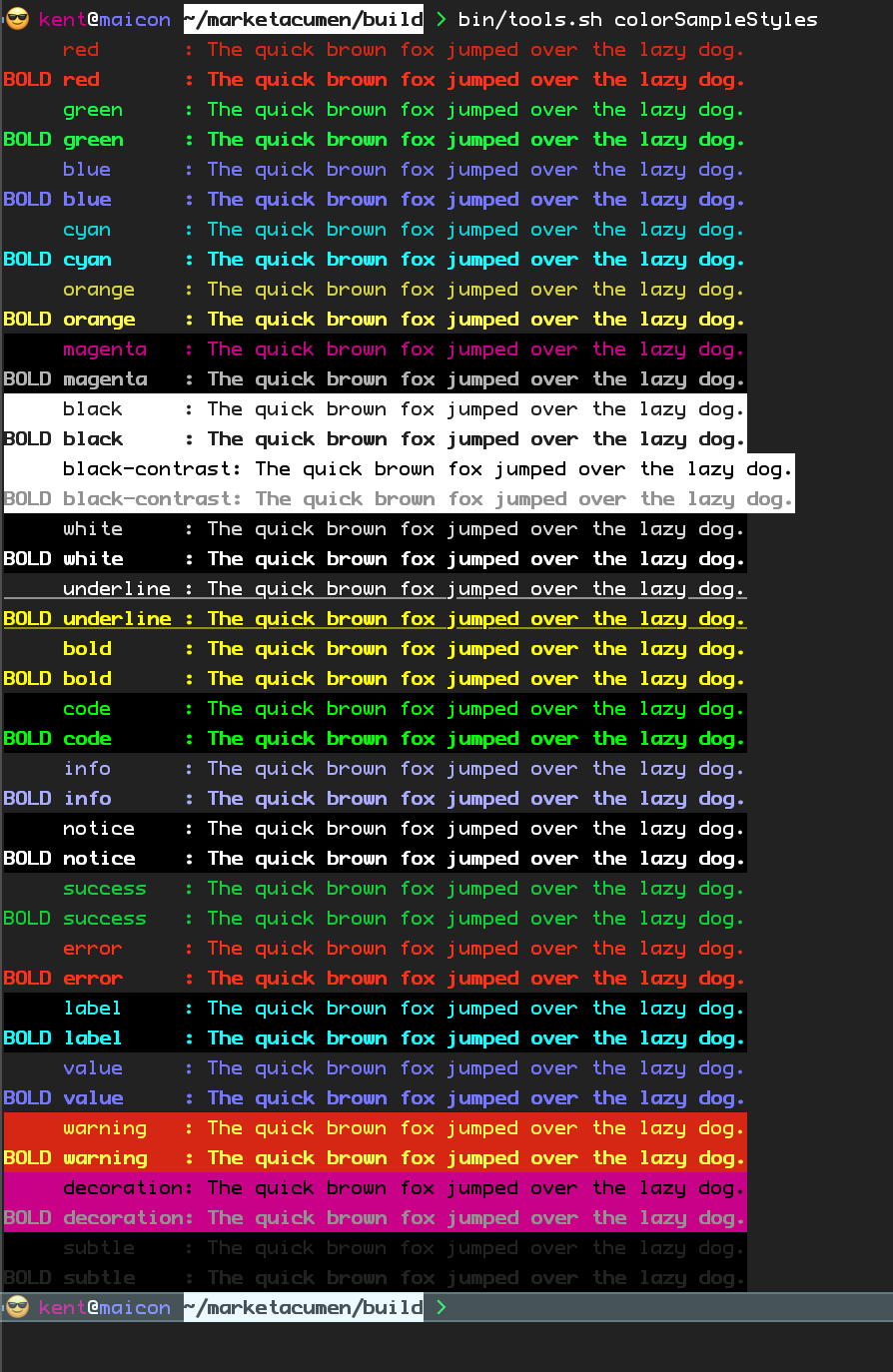
colorSampleSemanticStyles
Output colors
Usage
colorSampleSemanticStyles
Outputs sample sentences for the action commands to see what they look like.
Location:
bin/build/tools/colors.sh
Arguments
- none
Return codes
0- Success1- Environment error2- Argument error
Sample output
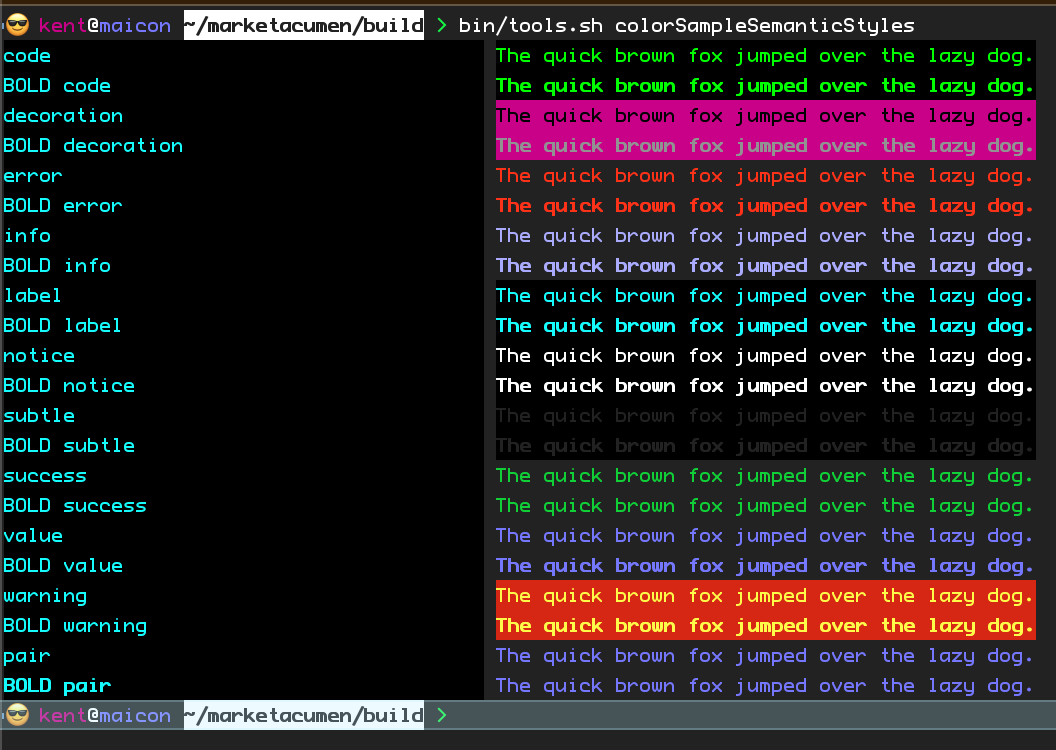
Color tools
colorFormat
Take r g b decimal values and convert them to
Usage
colorFormat [ format ] [ red ] [ green ] [ blue ] [ --help ]
Take r g b decimal values and convert them to hex color values Takes arguments or stdin values in groups of 3.
Location:
bin/build/tools/colors.sh
Arguments
format- String. Optional. Formatting string.red- UnsignedInteger. Optional. Red component.green- UnsignedInteger. Optional. Blue component.blue- UnsignedInteger. Optional. Green component.--help- Flag. Optional. Display this help.
Reads standard input
list:UnsignedInteger
Return codes
0- Success1- Environment error2- Argument error
colorMultiply
Multiply color values by a factor and return the new
Usage
colorMultiply factor redValue greenValue blueValue [ --help ]
Multiply color values by a factor and return the new values
Location:
bin/build/tools/colors.sh
Arguments
factor- floatValue. Required. Red RGB value (0-255)redValue- Integer. Required. Red RGB value (0-255)greenValue- Integer. Required. Red RGB value (0-255)blueValue- Integer. Required. Red RGB value (0-255)--help- Flag. Optional. Display this help.
Return codes
0- Success1- Environment error2- Argument error
Requires
colorNormalize
Redistribute color values to make brightness adjustments more balanced
Usage
colorNormalize [ --help ]
Redistribute color values to make brightness adjustments more balanced
Location:
bin/build/tools/colors.sh
Arguments
--help- Flag. Optional. Display this help.
Return codes
0- Success1- Environment error2- Argument error
colorParse
Parse a color and output R G B decimal values
Usage
colorParse [ color ] [ --help ]
Parse a color and output R G B decimal values Takes arguments or stdin.
Location:
bin/build/tools/colors.sh
Arguments
color- String. Optional. Color to parse.--help- Flag. Optional. Display this help.
Reads standard input
list:colors
Return codes
0- Success1- Environment error2- Argument error
colorBrightness
Return an integer between 0 and 100
Usage
colorBrightness [ --help ] [ redValue ] [ greenValue ] [ blueValue ]
Return an integer between 0 and 100 Colors are between 0 and 255
Location:
bin/build/tools/colors.sh
Arguments
--help- Flag. Optional. Display this help.redValue- Integer. Optional. Red RGB value (0-255)greenValue- Integer. Optional. Red RGB value (0-255)blueValue- Integer. Optional. Red RGB value (0-255)
Reads standard input
3 integer values [ Optional ]
Return codes
0- Success1- Environment error2- Argument error